
Set up your account
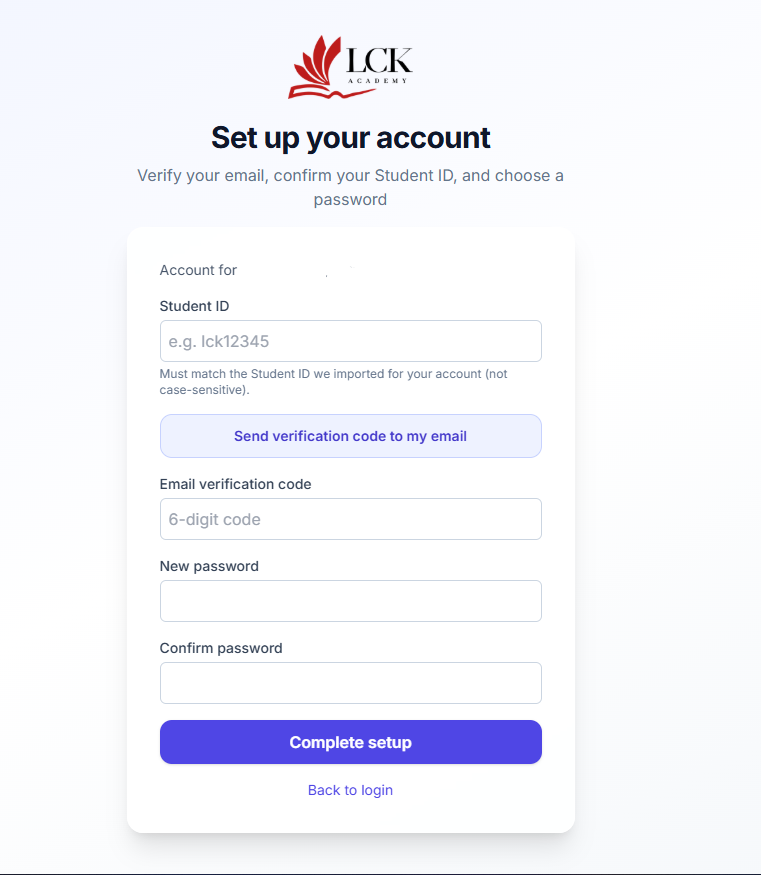
After you receive your invitation email, verify your address, confirm your Student ID, and create your password.
Before you start
You receive a personal email from LCK Academy with a Set up my account button. The link expires after a number of days — open it on a device where you can read your student email for the verification code.
Steps
- Open the setup link from your email.
- Enter your Student ID (the ID registered for you on the portal — not case-sensitive).
- Click Send verification code to my email and wait for the 6-digit code.
- Enter the code, choose a password (minimum 8 characters), and confirm it.
- Click Complete setup. You will be redirected to the login page.
Tips
- Use the latest verification email if you requested more than one code.
- After setup, sign in on the portal using your email and the password you just created.